
0. Company lock (read before Friday)
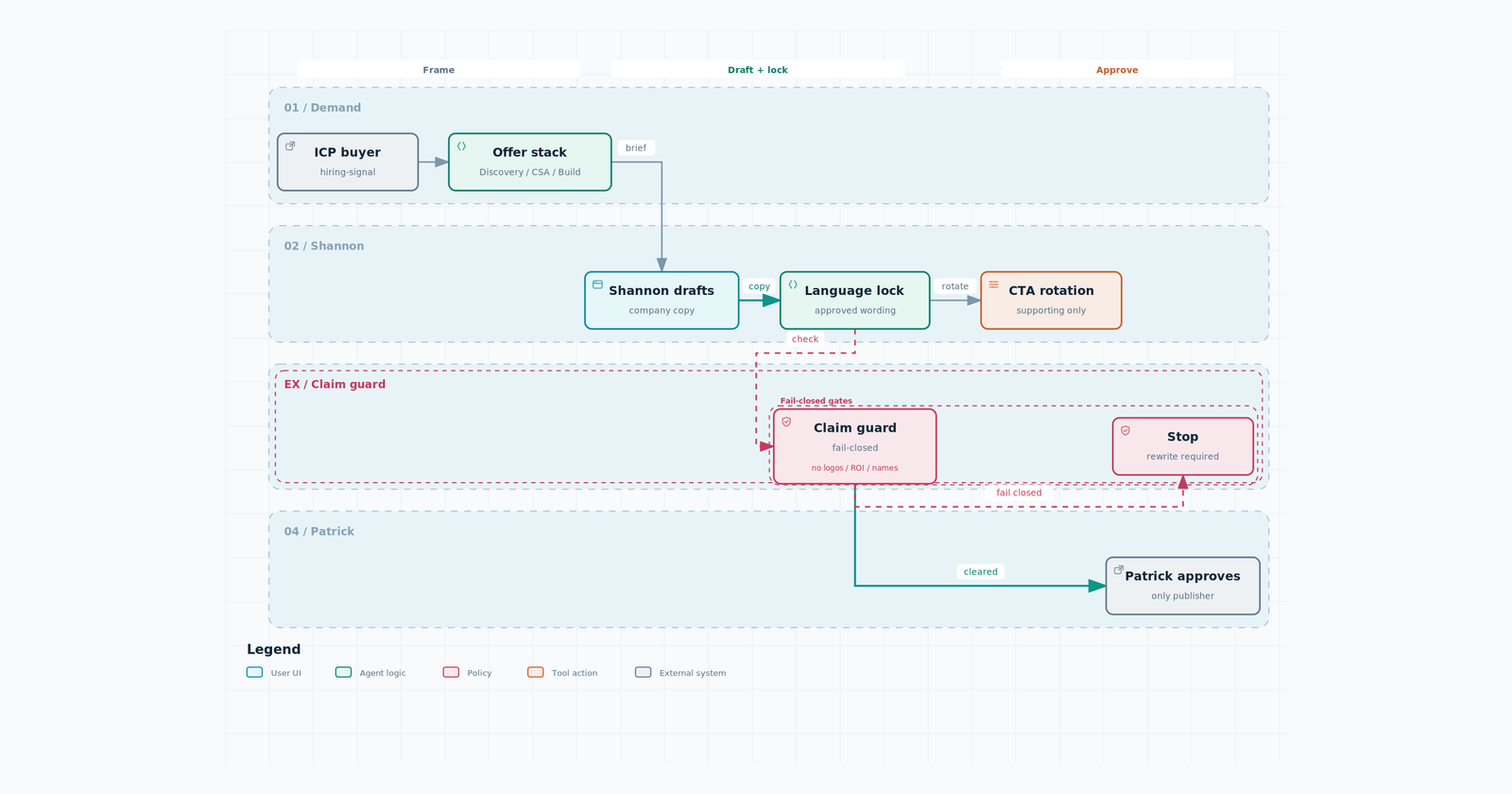
What we sell
Operational AI for industrial and project-based companies in the US and Canada (supported revenue over $10M). Manufacturing, construction/fabrication, energy and field service, industrial services, logistics. Buyer is C-suite / VP / director over the function.
Product is Your Company GPT plus connected agents that live in the tools they already use. Not a new dashboard.
Beachhead: coordinator work that is mostly chase (procurement coordinator, expediter, logistics coordinator).
Positioning, always: Win more work. Move it faster. Deliver on time.
How we sell
20-minute discovery → $3,500 Current State Assessment (credited toward build) → custom implementation starting at $35k over 90–120 days. Then Managed AI Systems ($5k/month) or Embedded AI Engineer ($18–25k/month).
Public content does not dump that price list unless Patrick put it in the script.
Language
Customer pain: unconfirmed POs, late dates, inbox/spreadsheet chase. Not internal offer copy. Not “AI strategy.” Not chatbot-agency.
CTA on Patrick’s posts (rotate, never skip)
- An engagement question tied to that post
- The role-automation map
- The $1,500 / 90-minute workshop (founder angle, not operator angle)
Not a calendar dump of the 20-minute discovery on every post.
Fail closed
- No named customers, logos, or live outbound accounts in public content
- No invented ROI, guarantees, or “we automated X at Company Y”
- Do not call a YouTube video a Current State Assessment
- Do not generate Patrick’s face or the logo. Use the approved wordmark file only
- Do not send DMs, publish, book, or pay. Draft, then Patrick
- RecStack and SearchNOW stay off First Article work
Your lane
Non-client-facing. Quality of prep, not revenue. You make Patrick faster: research, packets, thumbnails, edits, packaging, outbound QC.
Friday questions (write answers)
- In one sentence, who is the buyer and what do they hire us to do?
- Name three things that would fail a draft.
- What is the CTA on a YouTube description vs a LinkedIn post?
How a week of content actually runs
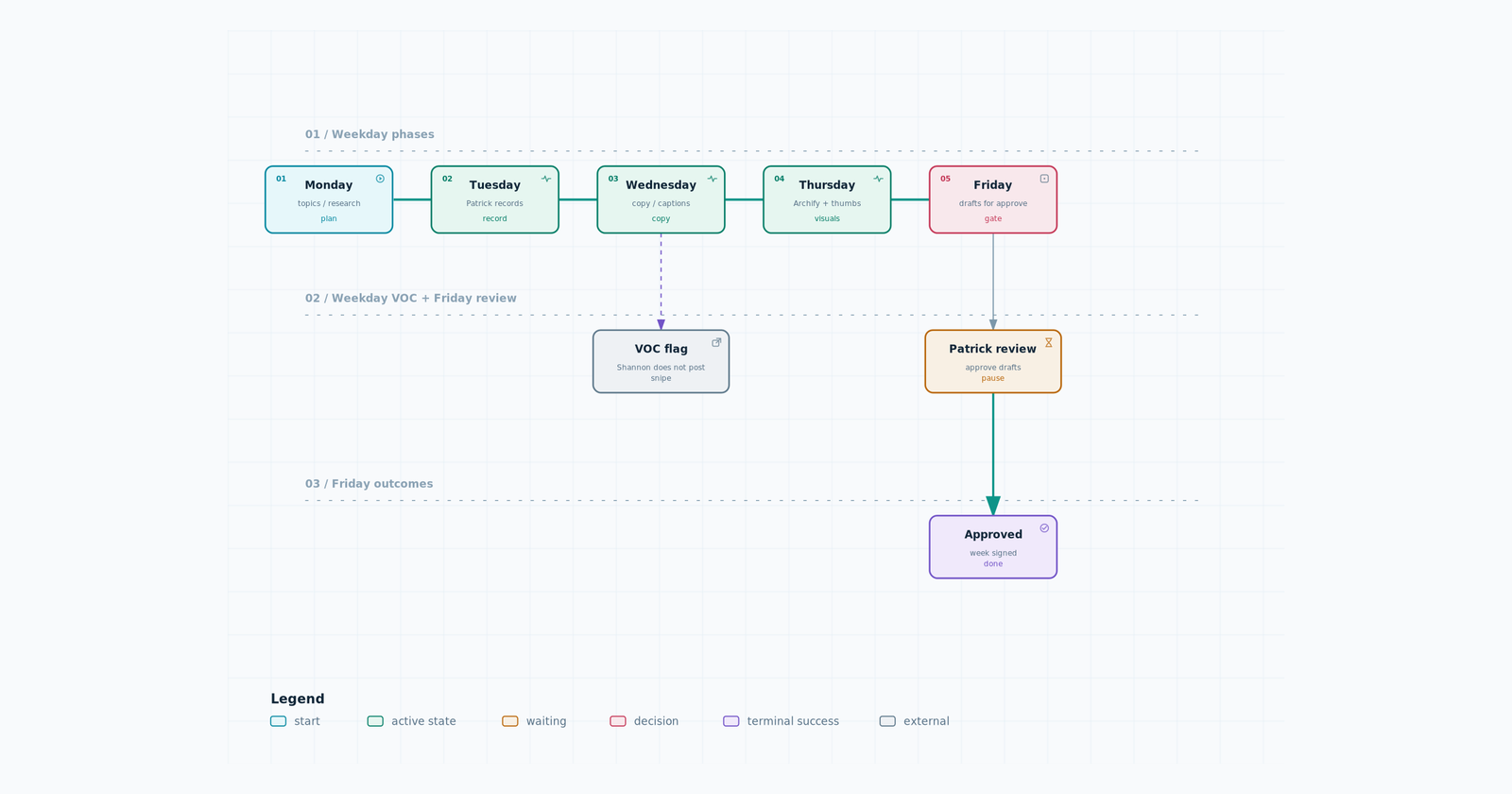
Three long-form episodes on one role theme, then 6–10 shorts cut from those three.
- Ep1 — anonymized job-description teardown (tasks → automate vs judgment → agent shape)
- Ep2 — the system behind that role type (never a named-company assessment). This is where Archify diagrams go on screen.
- Ep3 — ICP conversation or talking-head substitute
Patrick records in Focus C. You do not invent a new recorder. Codex stays out of the edit.
Before he records, you hand him a recording packet:
- One-sentence promise
- 5–8 spoken beats
- Do-not-say list
- On-screen list (JD bullets scored automate / assist / human, or the Archify diagram)
- Working title + description
- Thumbnail concept
After he records: long-form cut → 6–10 shorts → five native captions (YouTube Shorts, LinkedIn, X, Instagram, Facebook). Same cut, different words. Then Patrick approves.
Content system (FAS version of the Mubbu cycle)
Do not copy Mogul’s offer, volume claims, or weekend job. Keep the mechanics:
X and LinkedIn now distribute on an interest graph. Follower count still matters. A second door is people who never followed Patrick but keep engaging with coordinator-chase, late POs, industrial ops, and operational AI. Write in the buyer’s language, not ours.
Write posts a VP would actually use. Stronger than a like: send to one person, quote with a take, reply, save, sit with (dwell). Reports, mutes, blocks, “not interested,” and low dwell work against us. Qualified attention beats empty reach. Do not chase view counts.
Five pillars. Stay on them. People follow for predictable value.
- Role teardowns (coordinator chase)
- Agent systems in the tools they already use
- ICP conversations / operator reality
- Patrick’s story and lessons (founder, not guru)
- What this is not (claim guard in public)
Pull topics with who / what / when / where / why / how. Repetition with direction, not a new theme every week.
Snipes. A conversation already has attention. Shannon flags it (weekday VOC / competitor watch). Patrick quotes with an opinion, a story, or a lesson. First line is why he has the right to talk. Tie it back to one pillar. Cadence guideline: most of the week is evergreen (the three episodes + shorts); the rest is live conversation. Shannon never posts the snipe.
Weekly cycle (Mon–Fri)
| Day | Shannon | Patrick |
|---|---|---|
| Mon | 7–10 topics around the pillars. Module 1 one-pager | Approve the theme |
| Tue | Packet on his desk | Records Focus C (~the talking-point list, not a 45-minute Mogul clock) |
| Wed | Copy, captions, AEO | — |
| Thu | Archify diagram + thumbnails | — |
| Fri | Queue drafts | Approves. Nothing publishes without him |
Snipes get flagged on the same weekday watches we already run. No Saturday/Sunday content job unless Patrick adds one.
Review what actually moved: topics, hooks, formats, profile visits, follows, map requests. AI drafts. Patrick’s thoughts stay in the packet.
Module 1 — Research for long-form talking points
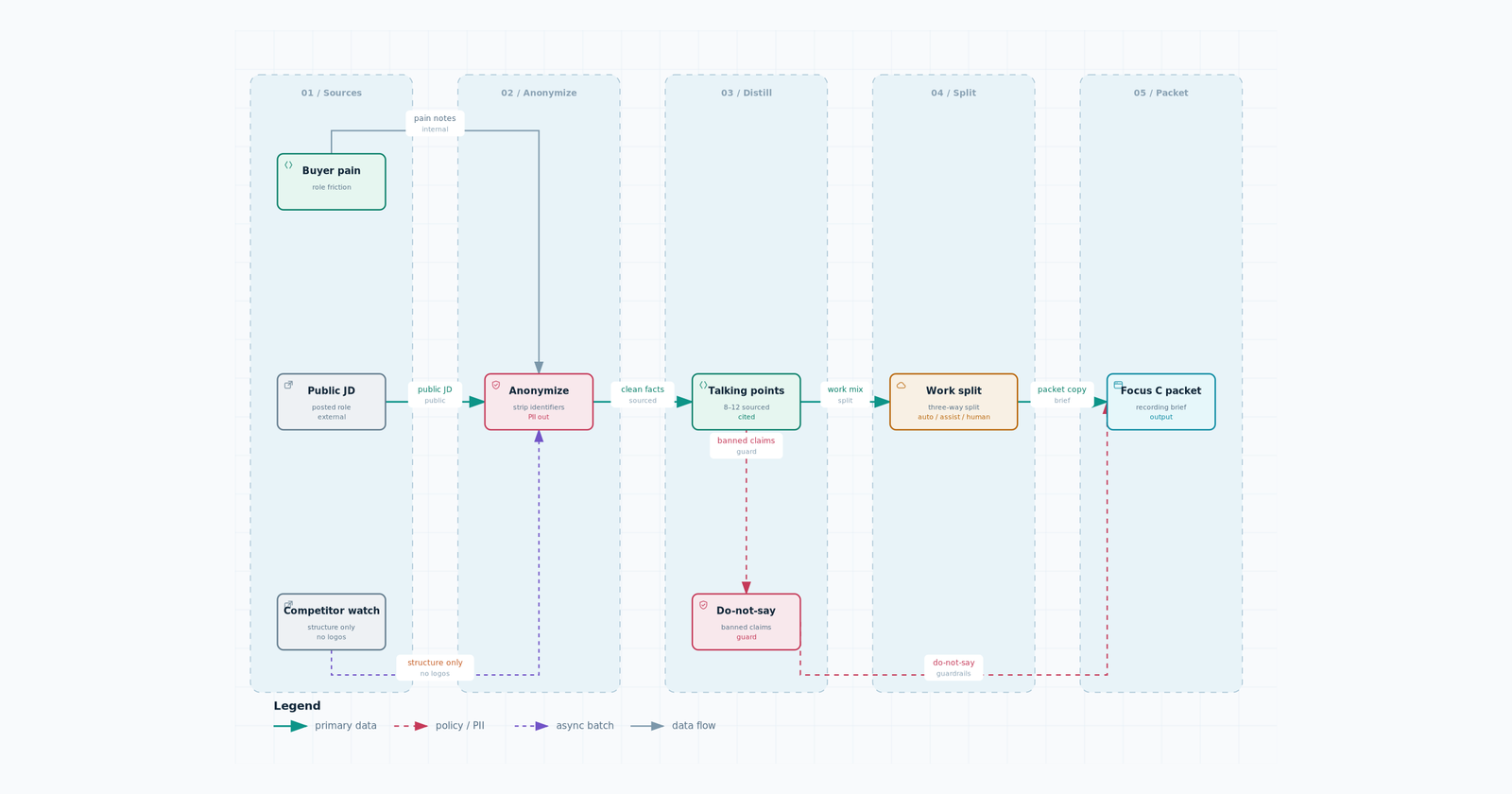
Job: Give Patrick 8–12 beats he can say on camera, sourced, not vibes.
Inputs: one anonymized JD or one ICP pain (unconfirmed PO, late date, chase). Competitor watch notes (structure only). Live public posts. Never a live outbound account name.
Output (one page):
- Buyer question this episode answers
- 8–12 talking points, each with a source or “from the JD”
- Automate / assist / human split for the role
- Do-not-say list
- 3 title directions (role + one concrete claim, no hype)
- Which of the five pillars this episode sits on
- One snipe candidate (a live public post he could quote), or “none this week”
Pass: He could sit down in Focus C without inventing a beat. Every point is specific (a task, a handoff, a system). No logo, no ROI.
Exercise (due Monday check-in): Take a public procurement-coordinator JD (anonymize the company). Produce the one-pager above. Score every bullet automate / assist / human.
Module 2 — Copywriting and script frameworks
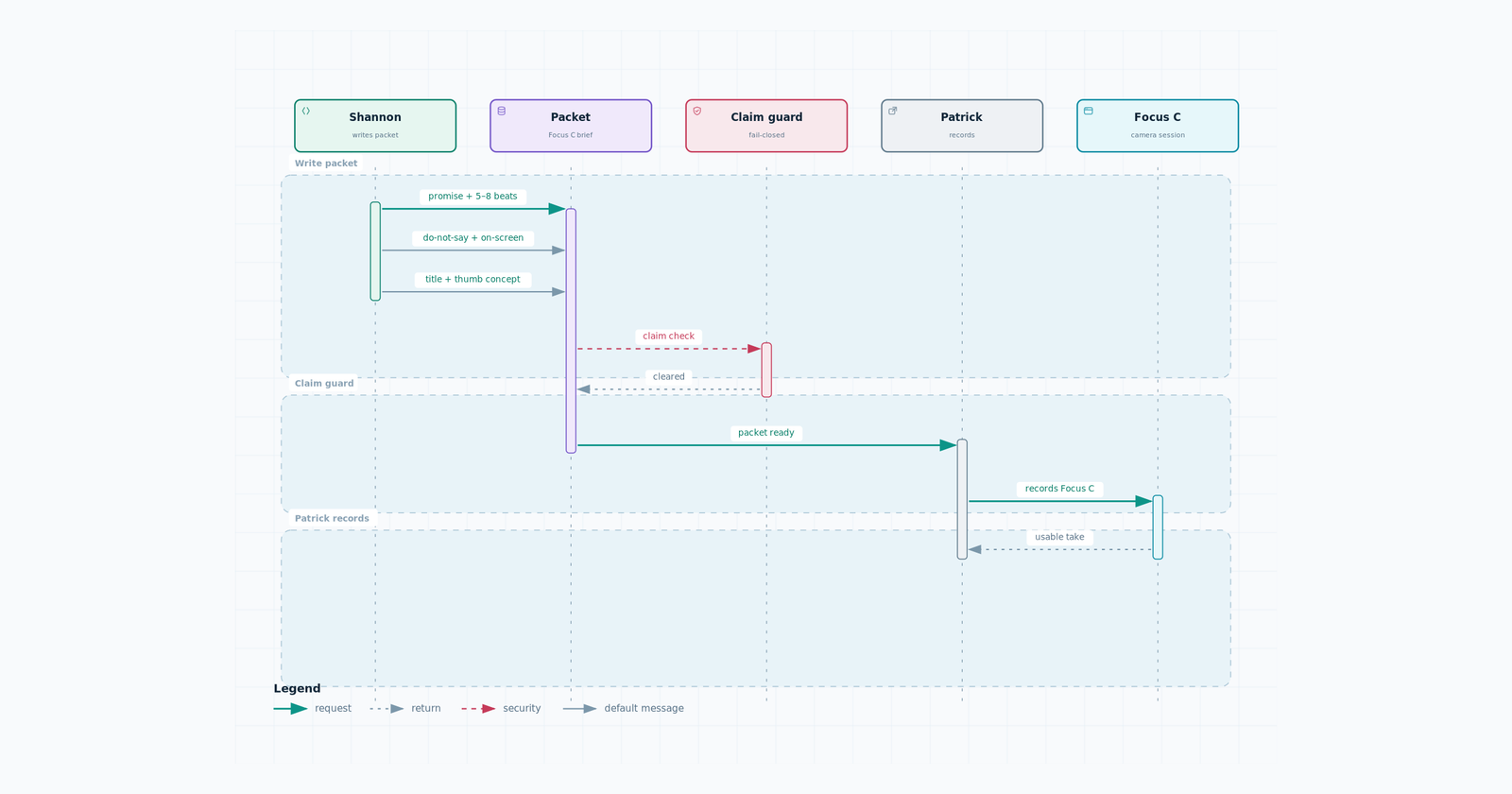
Job: Turn Module 1 into the recording packet. You write the frame. He talks.
Framework (every long-form):
- Promise (what they can score or see when it ends)
- The job as it actually runs (chase, not org-chart poetry)
- Split: automate vs judgment
- The agent in their existing tools (email, ERP, spreadsheet — not a new app)
- Human approval stays in the loop
- What this is not (not a dashboard, not a paid assessment, company unnamed)
- CTA from the rotation
Voice: Direct. Industrial. Short sentences. No “unlock,” “revolutionize,” “game-changer,” “thoughts?”
Share test (run on the LinkedIn/X caption, not the YouTube script): Would a VP send this to one person, quote it, or save it? If it only asks for a like, rewrite.
Pass: Packet fits on one page. He can record without reading it verbatim. Claim guard is clean.
Exercise: Turn Monday’s one-pager into a full recording packet for Ep1.
Module 3 — YouTube thumbnail design
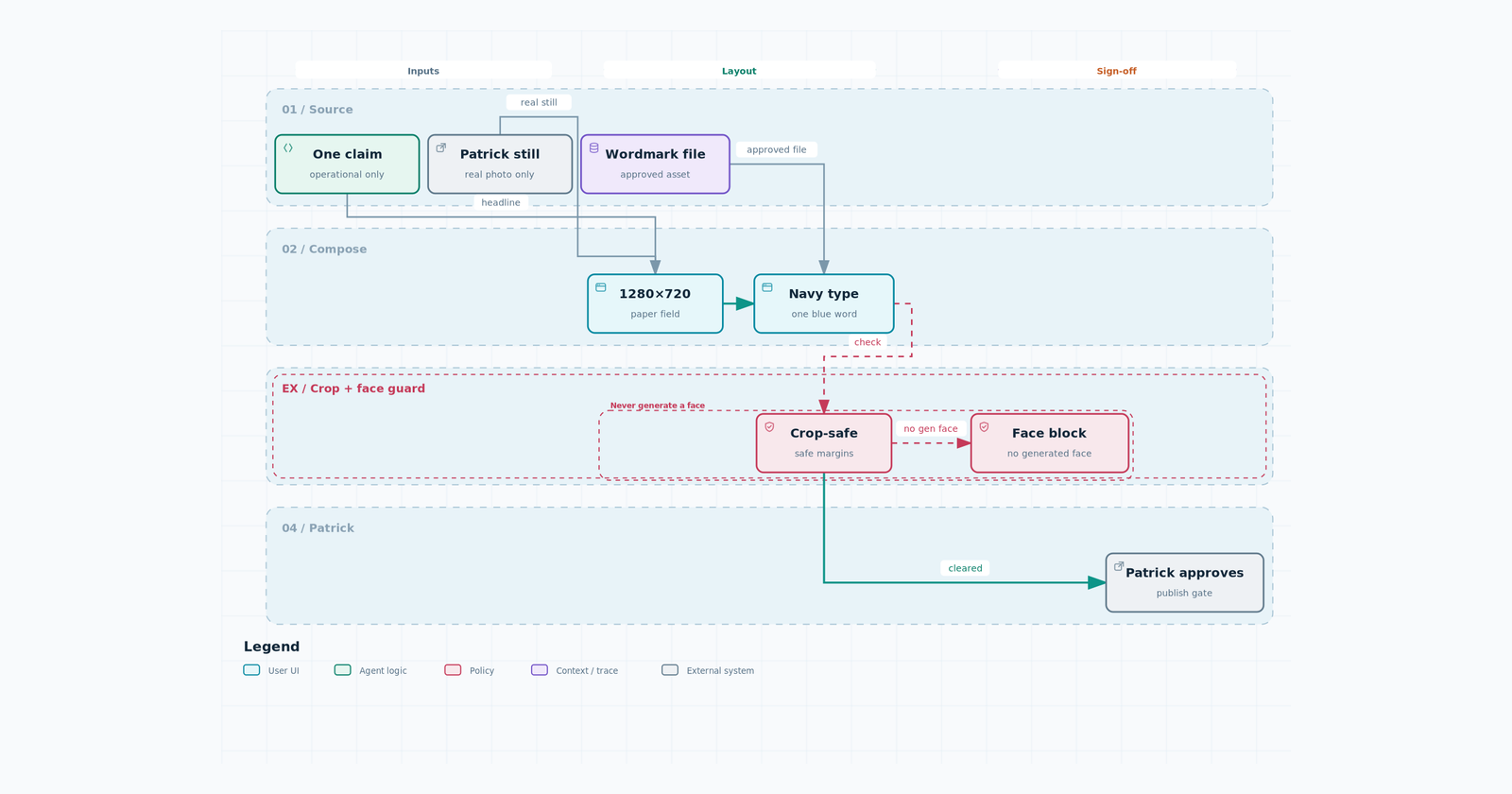
Job: One operational claim on a 1280×720 frame. You already have design skill. This is the FAS lock.
Template (match live channel, not a new look):
- Paper/white field, navy type, one electric-blue word
- Patrick still on the right over a light blueprint (use a real still — never generate his face)
- Stacked all-caps punch, one bright-blue word
- Navy footer bar
- Crop-safe: claim and face out of lower-right duration badge and left 10%
On the frame: one claim. Examples of the type: “It does not approve the PO.” “75% of this job is chase.” “Not another dashboard.” No company name, price, or guarantee.
Wordmark: approved file only. If you do not have it, ship without a logo and say so.
Exercise: Three thumbnail comps for Monday’s Ep1. Same claim, three crops. Mark crop-safe boxes.
Module 4 — Long-form video editing
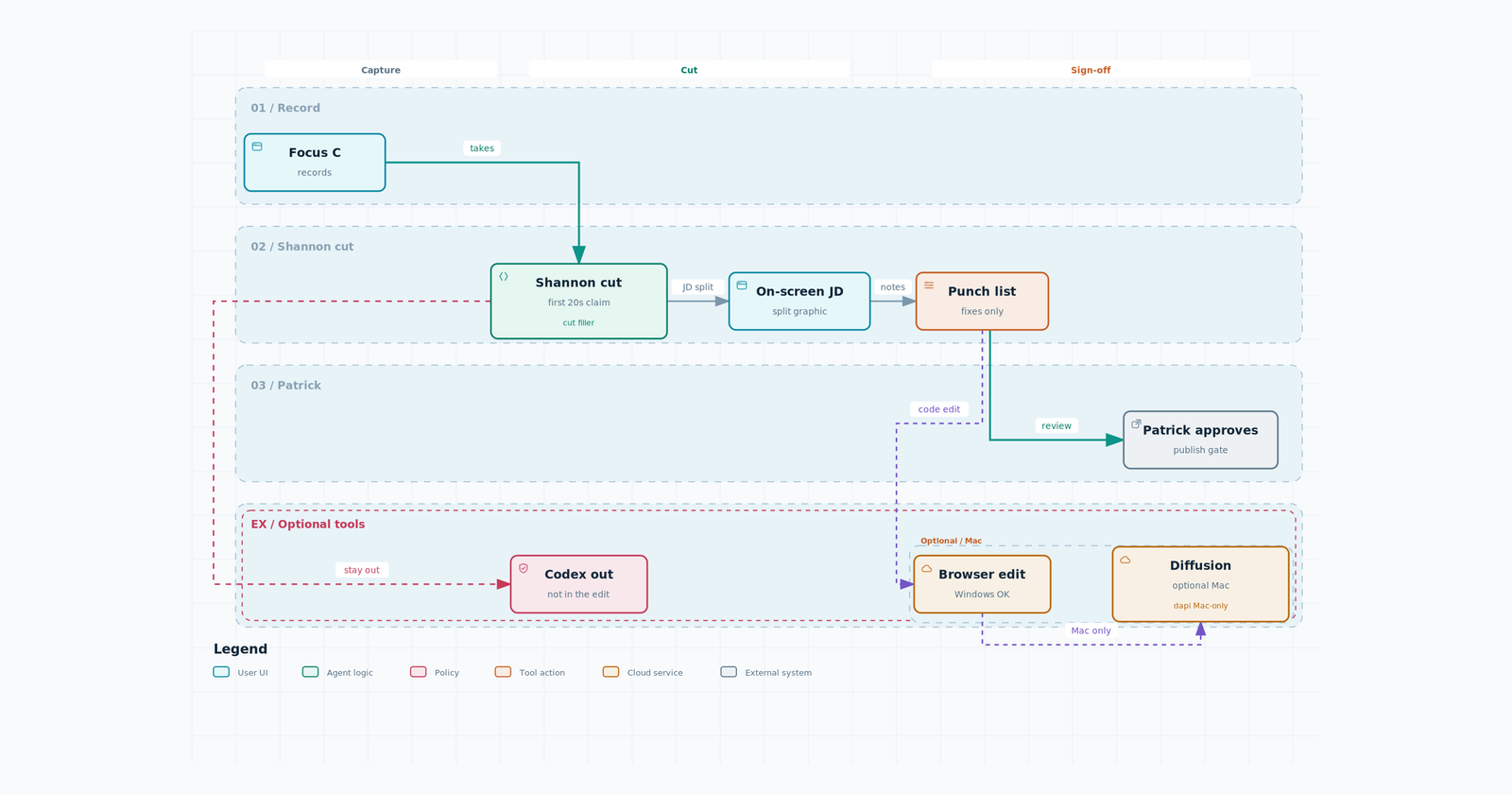
Job: Make the episode watchable for a VP of ops. Not cinematic for its own sake.
Patrick records in Focus C. You cut. Codex stays out of the edit.
Cut for:
- First 20 seconds: promise + why this role
- Kill throat-clearing, repeated setup, “as I mentioned”
- Hold on-screen JD bullets / automate-vs-human when he scores them
- Ep2: hold the Archify diagram while he walks the path
- Lower-thirds: role type, not a fake company
- End card: next episode title, not a calendar dump
Handoff to Patrick: cut + punch list (what you took out, what still needs a pickup). He approves before upload.
Agent-assisted cut (Diffusion Studio)
Live sources: Casey, Diffusion, skills at https://github.com/diffusionstudio/skills, product at https://diffusion.studio.
The point: the edit is code. Agents lose context and spit out files you cannot change. Diffusion keeps the timeline as JSX you can modify.
How Shannon uses it (when Patrick says the tool is on):
- Focus C file is the A-roll. Never generate Patrick’s face.
- Browser editor works on Windows. The
dapi/ coding-agent path is currently macOS only (their FAQ, 2026-09-02). Do not assume Agent OS PC can run it. - Write a one-page edit brief first (same punch list). Then the cut.
- Probe the file, filmstrip, transcript with timestamps, then cut. Captions last.
- Optional later: Remotion skills on top of Diffusion skills. Not week one.
- You still return a punch list. Patrick still approves. Codex still stays out.
If Diffusion is not installed yet, cut in the editor you already use. Same brief, same pass bar.
Exercise: After the first Focus C recording, return a cut with a one-page punch list. Time-to-first-claim in the first 20 seconds.
Module 5 — Short-form video editing
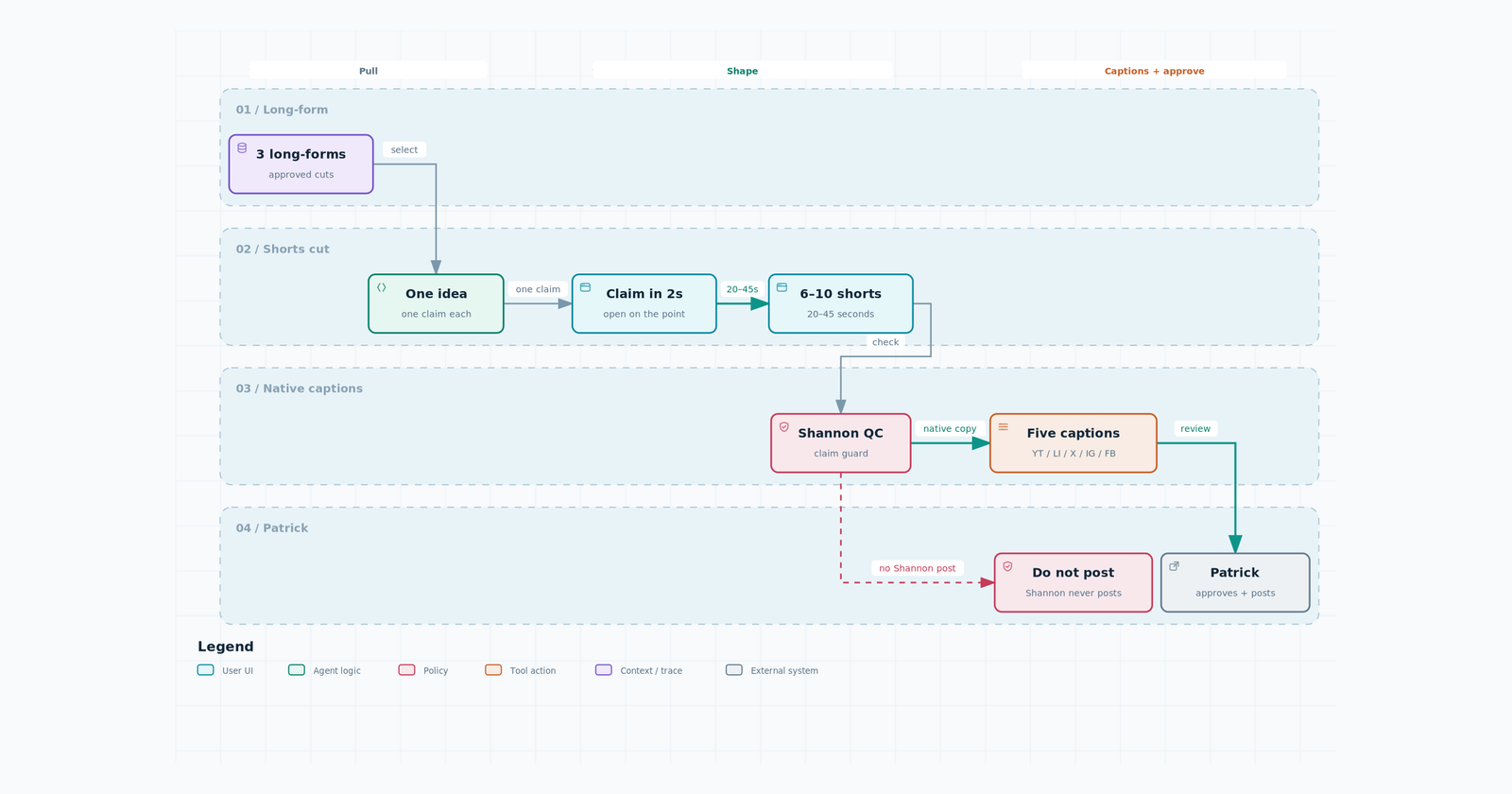
Job: 6–10 shorts from the three long-forms. One idea per short.
Each short:
- One claim in the first 2 seconds (on-screen)
- 20–45 seconds
- No “watch the full video” as the idea
- Five captions, not one pasted five times:
- YouTube Shorts: one line + long-form link when it exists
- LinkedIn: executive, one operational claim, no hashtag dump
- X: one sentence
- Instagram: spoken-first; on-screen already has the claim
- Facebook: same idea as LinkedIn, plainer
Pass: A VP of ops would stop. Claim guard on every caption. Share test on the LinkedIn and X captions.
If Diffusion is on, shorts are the same JSX project as the long-form, not a second mystery export.
Exercise: Cut 3 shorts from the first long-form. Write all five captions for one of them.
Module 6 — SEO and AEO
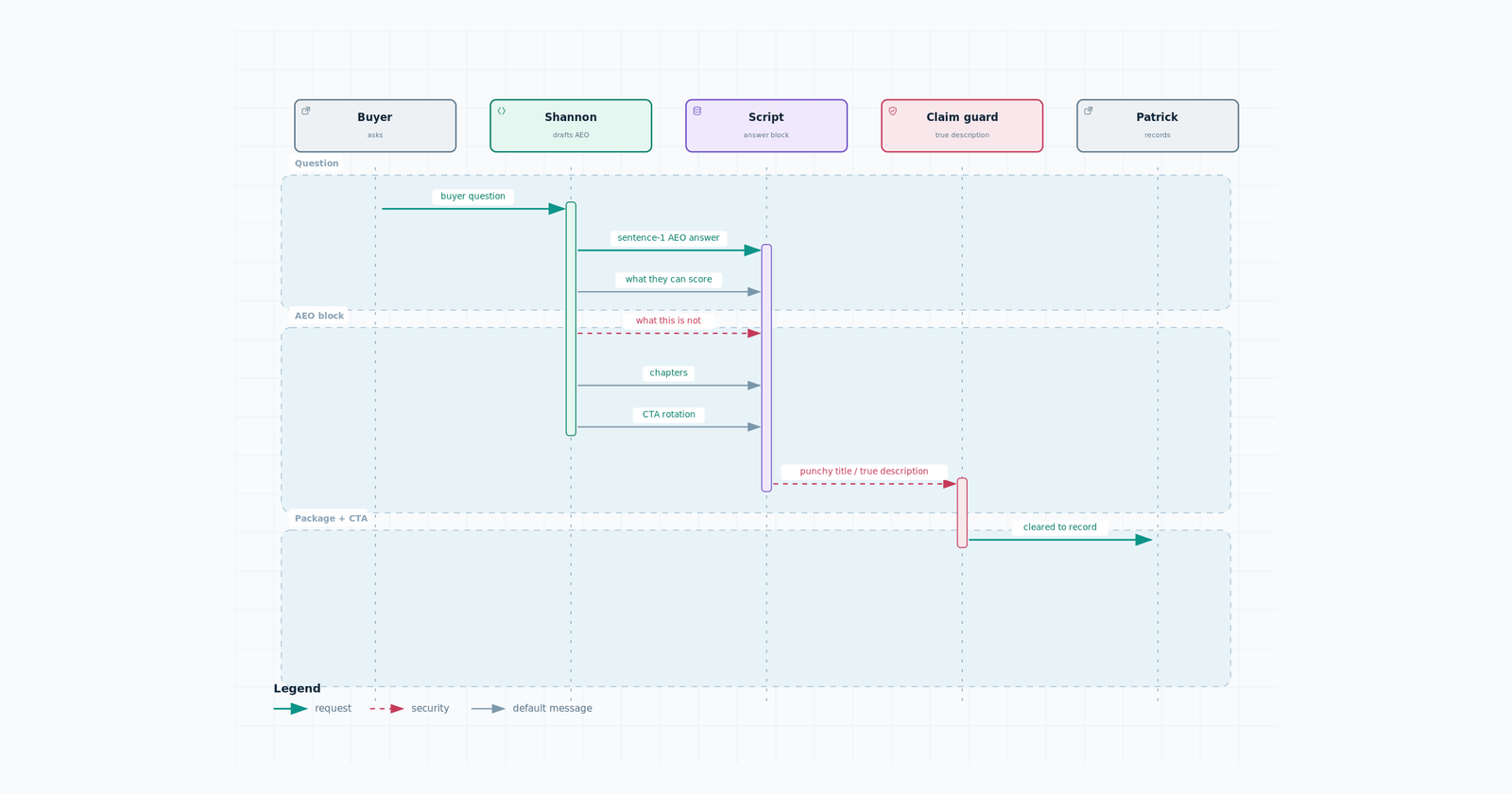
Job: The buyer question is answered in sentence 1 of the YouTube description (and any page we publish). Title can be punchy. Description must be searchable and true.
Description order:
- AEO line: question + answer in sentence 1 (operational AI, unconfirmed/late PO chase — not internal offer copy)
- What they will be able to score or see
- What this is not
- Chapters = spoken beats
- Soft CTA from the rotation
- No price list unless it was in the script
Titles: 5 options, ~60 characters, role or system + one concrete claim. Avoid “assessment,” “audit,” “case study,” guarantees.
Pass: Someone searching “procurement coordinator purchase order chase” could land on it. Facts match the site.
Exercise: Write 5 titles + the full description for Monday’s Ep1. Highlight the AEO sentence.
Module 7 — Trigger-led outbound, system maintenance and QC
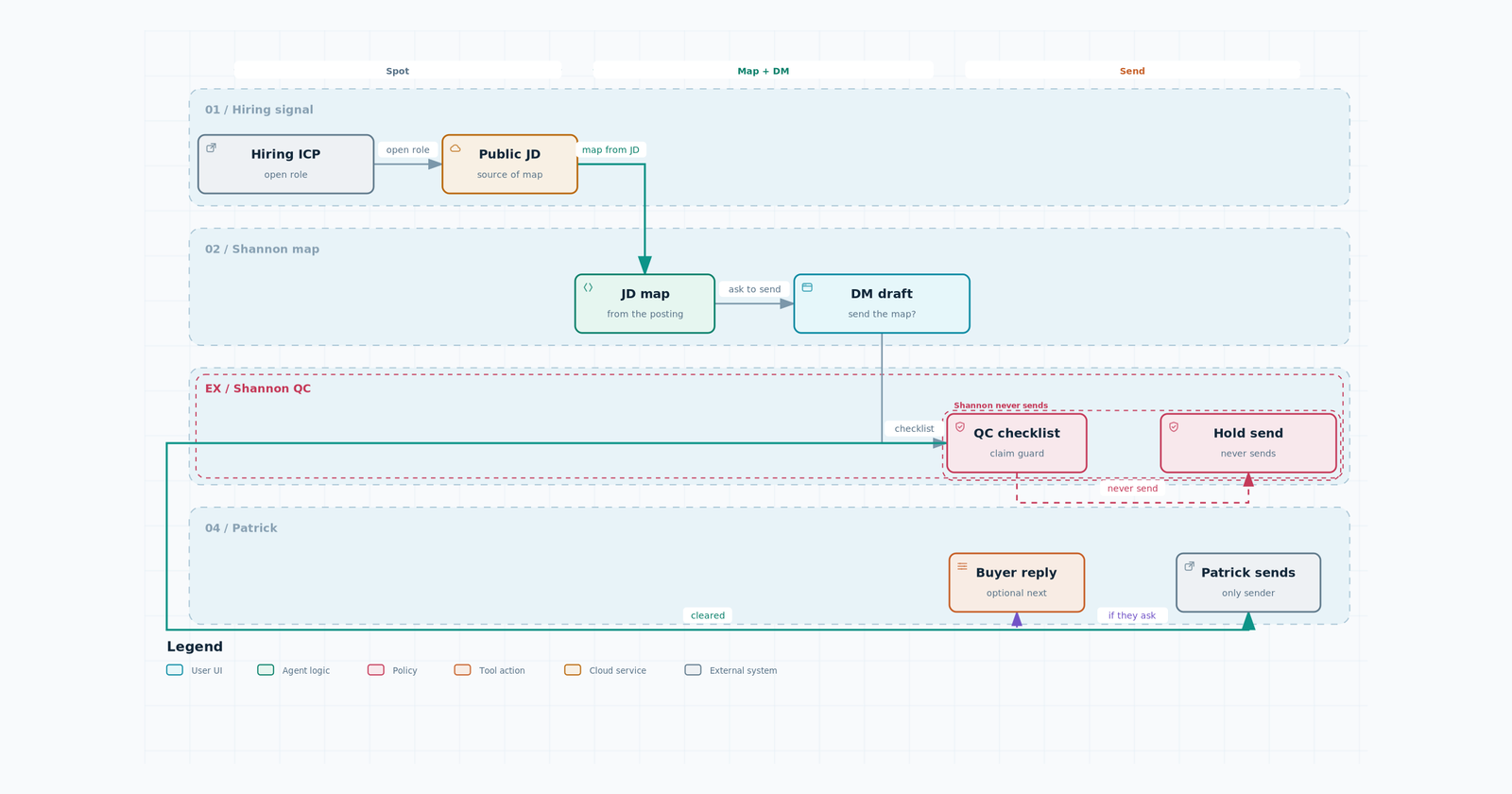
Job: You do not send. You keep the machine honest.
Motion: company is hiring a coordinator-type role → we draft a map from the JD → DM the executive: “can I send the map,” not a naked calendar link.
QC checklist (every account before Patrick sees it):
- US or Canada industrial / project-based, established (not a two-person shop)
- Role is chase (procurement, expediter, logistics, buyer) not culture/HR
- Buyer is C-suite / VP / director of that function
- JD URL, title, location, posted date captured
- Map exists and does not name the company in any public teardown the same week
- DM is Patrick’s voice: direct, no chatbot-agency, no guarantee
- CTA is the map
- Batch is small enough he can approve the same day
Maintenance: flag stale JDs, missing maps, DMs that drifted into calendar-dump, ICP misses, duplicate accounts.
Exercise: QC a batch of 5 (Patrick will give you the folder). Return a pass/fail table with the failing line quoted.
Module 8 — Archify diagrams for FAS content
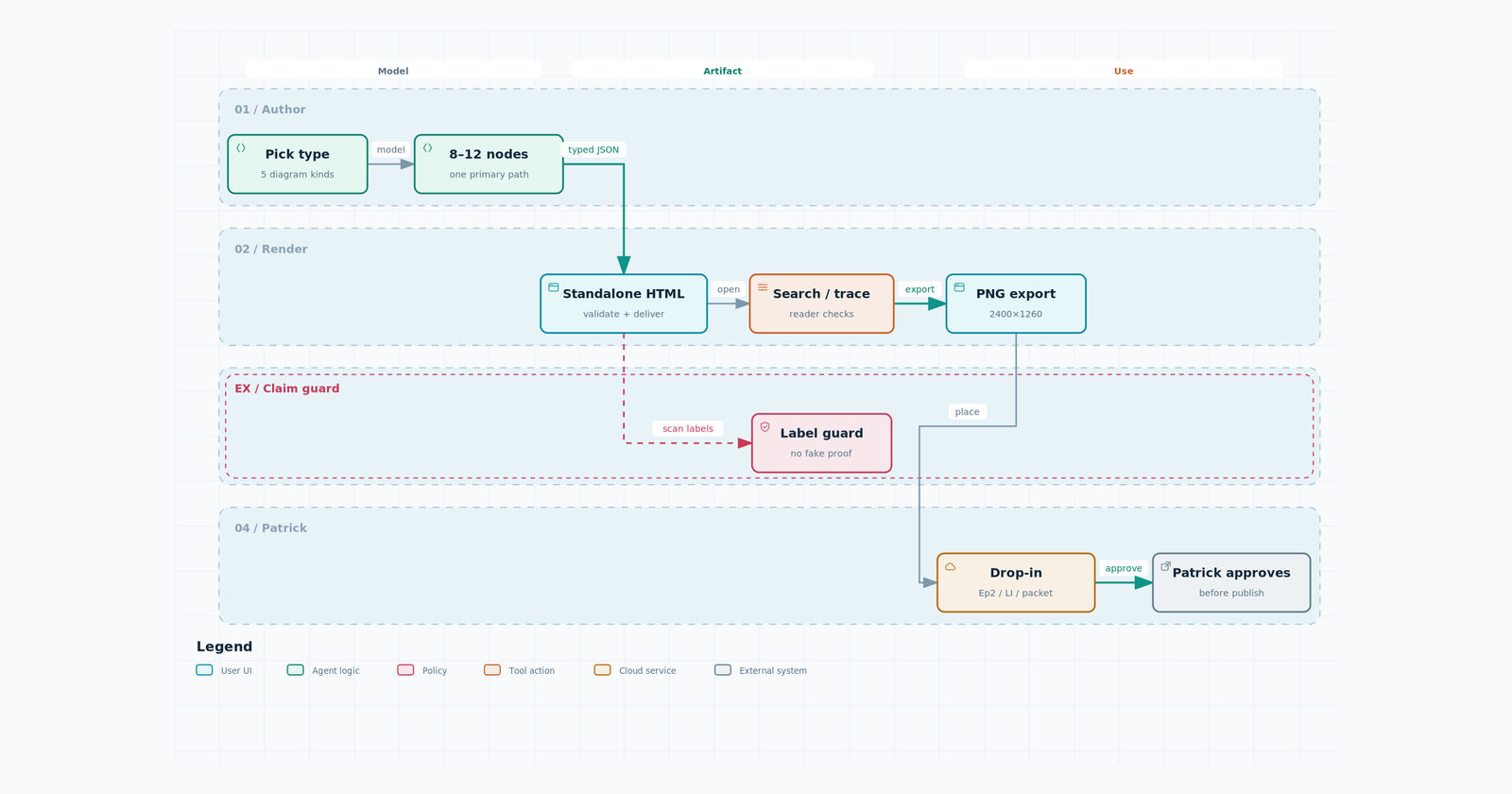
Job: Every system we explain in public gets a real diagram, not a slide poem. This is how Ep2 earns the “system behind the role.” It is also how these trainings themselves are drawn.
Live source: Voxyz. Tool: Archify (MIT). Install: npx skills add tt-a1i/archify -g
When you use it
- Ep2 on-screen (the agent path through email / ERP / spreadsheet)
- Recording-packet “on-screen list” when the list is a system, not JD bullets
- LinkedIn/X carousel that needs a map (Patrick still approves)
- Any new training module we write for you (diagram first, then the doc)
Not for thumbnails. Not for Patrick’s face. Not for the wordmark.
Prompt template (paste this, fill the brackets):
Turn [CODEBASE / FEATURE / WORKFLOW] into a [DIAGRAM TYPE] diagram. Choose from Architecture, Workflow, Sequence, Data Flow, or Lifecycle.
Keep the 8–12 most important components and one primary path. Label external services, databases, and component connections clearly. Put supporting details in cards instead of adding more edges to the main diagram.
Generate and verify a standalone HTML file. Confirm that component search and upstream/downstream tracing work, then export a high-resolution 2400 × 1260 PNG.
Pick the type
- Architecture — components and boundaries (Your Company GPT + agents in their stack)
- Workflow — approvals, runbooks, chase loops
- Sequence — one PO / RFQ / exception as it moves
- Data Flow — where the date, the email, the ERP row go
- Lifecycle — states: unconfirmed → promised → slipped → recovered
FAS lock on every diagram
- Paper/navy, one electric-blue accent if the preset allows. Otherwise leave Archify classic and say so
- 8–12 nodes. One primary path. Cards for the rest
- No named customer. No ROI. No “we automated X”
- Human approval is a node, not a footnote
- Wordmark file only if Patrick supplied it. Never typeset the logo. Never generate a face
- HTML is the source. PNG 2400×1260 is what goes on screen or in a post
- Patrick approves before it ships
What “done” looks like
Open the HTML. Search a component. Trace upstream and downstream. Export PNG. Drop the PNG into the packet or the Ep2 timeline.
Exercise: Take Monday’s procurement-coordinator one-pager. Produce one Workflow diagram of the chase loop (email → spreadsheet → supplier → unconfirmed date → human approval). Ship HTML + 2400×1260 PNG. Run claim guard on every label.
Claim guard (run on every draft)
Fail the draft if any of these are true:
- A live hiring company or outbound account is named in public content
- A video is called a Current State Assessment, audit, or paid analog
- ROI promise, invented metric, or guarantee
- Pricing or offer changed without Patrick
- RecStack / SearchNOW mixed in
- Naked calendar CTA unless Patrick asked for it
- Agent awards vendors, sets price, or promises the customer
- Generated face or typeset logo
- A diagram names a customer, shows a fake ROI, or hides the approval step
Return pass/fail with the failing lines quoted. Do not “fix quietly” and ship.
First 10 days
| Day | You do | Bring to check-in |
|---|---|---|
| Thu | Read this + the visuals | — |
| Fri 12:00pm CT | Q&A with Patrick | Written answers to section 0 |
| Mon | Module 1 | One-pager talking points + pillar + snipe-or-none |
| Tue | Module 2 | Recording packet |
| Wed | Module 3 | 3 thumbnail comps |
| Thu | Module 8 (diagram for Ep2) then 4 or 5 | Archify HTML+PNG; cut or shorts if a recording exists |
| Fri | Module 6 | Titles + AEO description |
| Next Mon | Module 7 | QC table on 5 accounts |
| Next Tue | Diffusion only if the tool is on; else skip | Brief + punch list, not a tool tour |
Daily Mon–Fri: 15 minutes. One job, one blocker, one draft.